Auto clicker for Windows
Click at any interval. Record and replay whole sequences, or build a macro and fire it from a hotkey. One 2.1 MB file with no installer, nothing bundled in it, and no account to create.
Free for 7 days, then $5 a year. No card until the trial ends.
Why this download is safe
One file, no installer
autoclickr is a single 2.1 MB program. There is no setup wizard and nothing is written outside it.
Nothing bundled
No toolbars and no second installer. Nothing else arrives with it.
No account
Download it and open it. There's no sign-up screen standing between you and the first click.
Runs offline
Everything happens on your machine. Nothing is sent anywhere, and the checksum is published below.
What people use an auto clicker for
An auto clicker is for any task that repeats the same click more times than a person wants to. These four situations come up most.
Idle and clicker games
Cookie Clicker and the rest of the genre run on repeated clicking, which is exactly the kind of work a machine should be doing instead of you. Set an interval and leave it going.
Grinding in games
Roblox, Minecraft and older MMOs, mostly for gathering. Check the rules for your game first. Many prohibit it.
Software with no bulk action
Admin panels that approve one record at a time, data entry forms, anything with no API and no export button.
Testing and QA
Record a sequence once, then replay it a hundred times at whatever speed you choose. Watch what breaks.
Auto clicker, recorder and macro builder
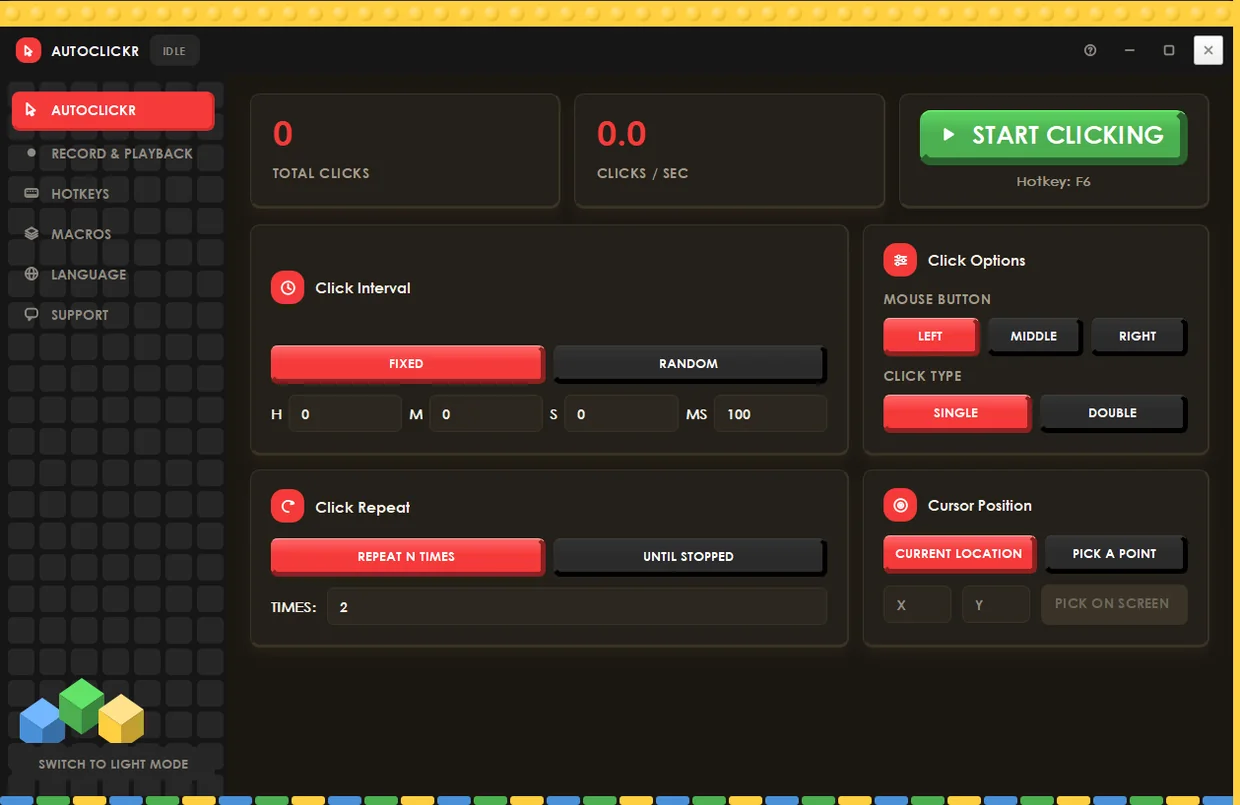
autoclickr is three tools in one window: a click repeater, an input recorder and a macro builder.
Auto clicking
Fixed intervals down to the millisecond, or a random range when you want the timing to look less mechanical. Left, middle or right button. Single or double click.
Click repeat
Run a set number of clicks and stop on its own, or run until you stop it. Click wherever the cursor sits, or lock it to an exact point on screen.
Record and playback
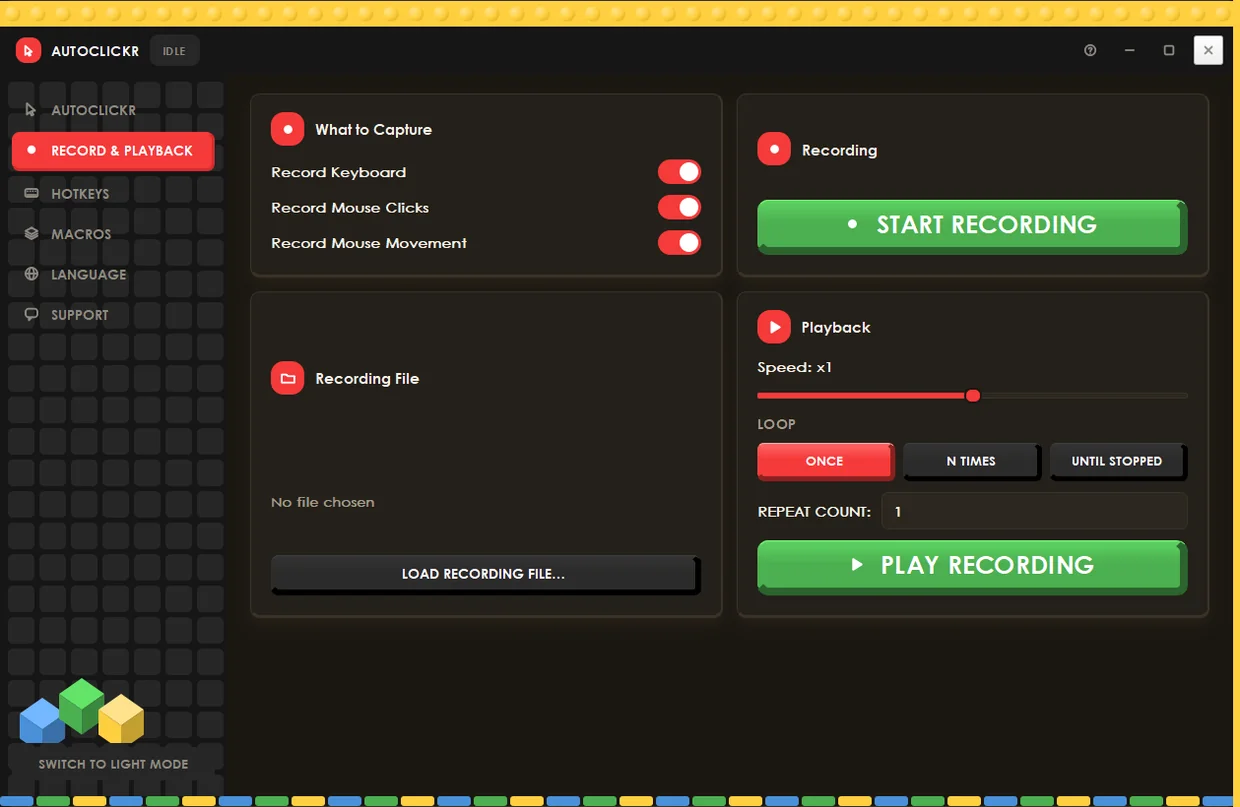
Record your keyboard, your clicks and your mouse movement, then replay the sequence: once, a set number of times, or looping until you stop it. Change the playback speed, and save recordings to a file you can load again later.
Macros
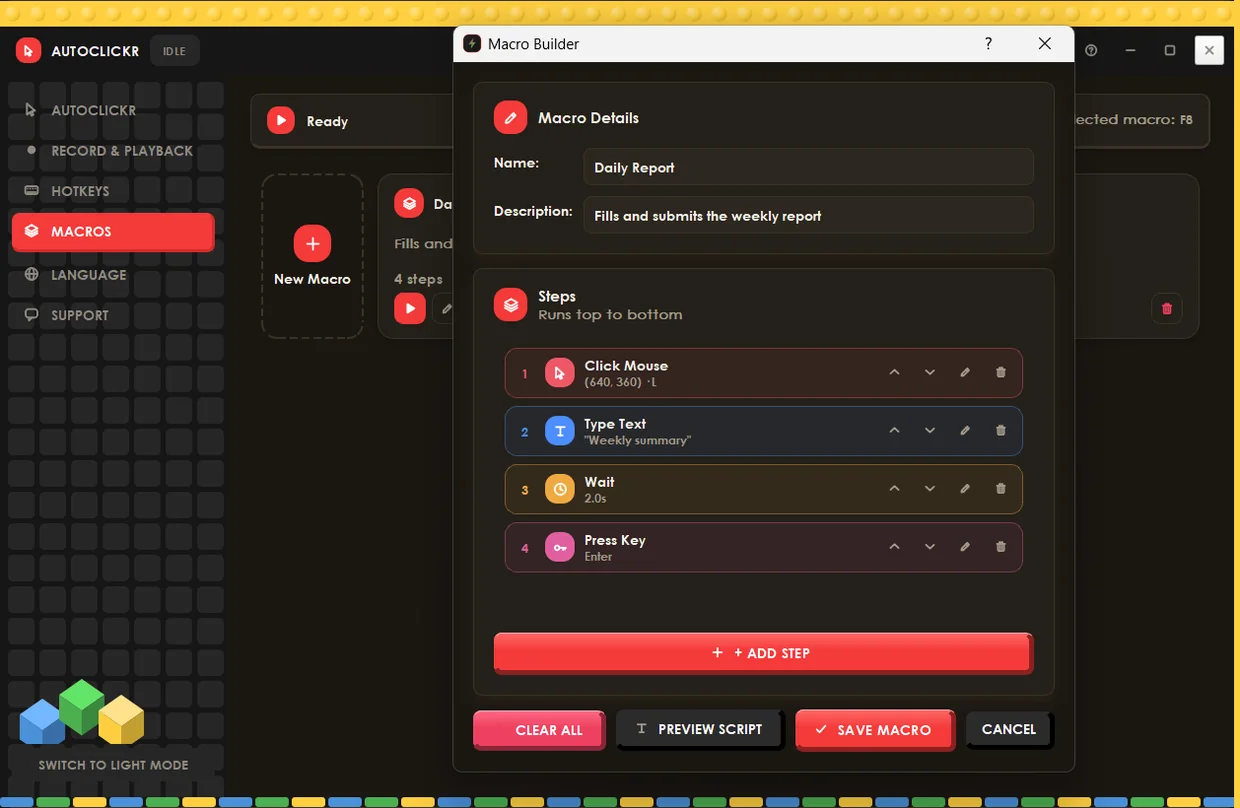
Build a sequence by hand instead of recording it. This one clicks a point, types a line of text, waits two seconds and presses Enter. Save it, then fire it with a hotkey.
Global hotkeys
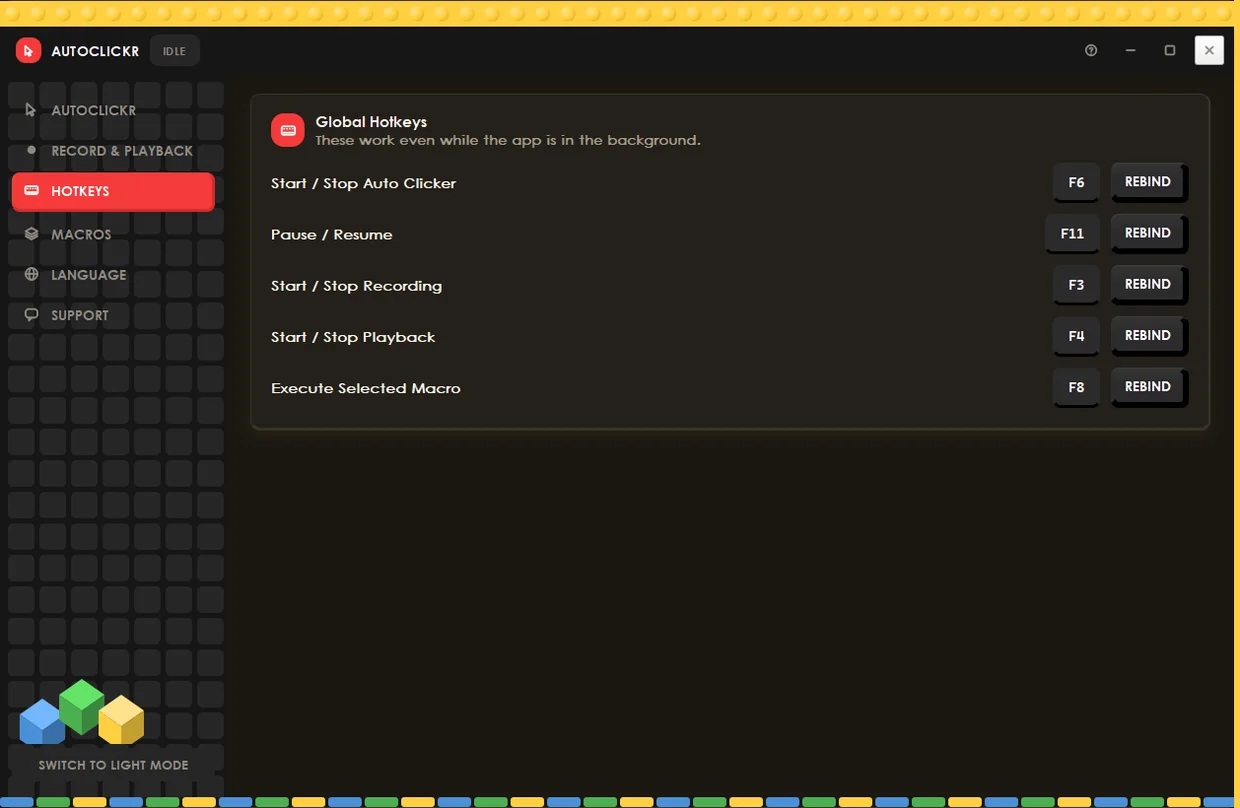
F6 to start and stop, F11 to pause, F3 to record, F4 to play back, F8 to run a macro. They keep working while the app sits behind your game or browser, and every one of them can be rebound.
How to use autoclickr
Using autoclickr is a three-step job. Set an interval, pick a hotkey, press it. About thirty seconds from download to first click.
Download and open it
No installer wizard, no account. Because autoclickr is new, Windows may show a SmartScreen warning the first time. Choose More info, then Run anyway.
Set your interval
Hours, minutes, seconds, milliseconds. The interval is the only setting most people need to think about. Try it on the right.
Press F6
Clicking starts wherever your cursor is. F6 again stops it, F11 pauses if you need to step away mid-run.
What an interval actually feels like
This block takes ten clicks to break. Drag the speed, switch it on, and see how fast that is in practice. It's the same number you'll type into the app.
Click the block yourself, or switch it on and leave it alone.
Auto clicker for Windows, Mac, Android and Chrome
autoclickr runs on Windows 10 and later, macOS 12 and later, and Android 9 and later. A separate Chrome extension covers clicking inside a browser tab.
Windows
Windows 10 and later, 64-bit.
macOS
macOS 12 and later. Apple silicon and Intel.
Android
Auto tapping and recorded gesture playback.
Pricing: five dollars a year
Not five a month. A utility this small has no business having a pricing table.
- The Windows app, with every feature unlocked
- Every feature, macros and recording included
- Updates for as long as you're subscribed
- Cancel from your account page, any time
Free for the first 7 days. We don't ask for a card until the trial ends.
Start the free trialPayments handled by Lemon Squeezy
Questions people actually ask
Is an auto clicker a virus?
No, though plenty of them get flagged as one. An auto clicker sends synthetic mouse input, which is also what some malware does, so antivirus tools treat unfamiliar clickers with suspicion by default. And the suspicion is partly earned. Unsigned installers from download portals do arrive with extra software attached, often enough to justify the caution.
autoclickr is a single program with no installer and no bundled extras. You can verify the file you downloaded matches the one we published using the checksum below.
Are auto clickers illegal?
No. An auto clicker is ordinary automation software, and owning or using one isn't against the law anywhere we're aware of. What varies is whether a particular game or service permits it, and that's a terms-of-service question rather than a legal one.
Breaking a game's rules can cost you the account. It isn't a crime.
Is an auto clicker safe to use?
The software itself is harmless. It sends the same click your mouse does, and the risk in this category has always been distribution rather than the clicking: many of the free auto clickers are unsigned, hosted on download portals, and packaged with adware, which is why antivirus software flags them so often.
autoclickr is distributed only from this site and installs nothing besides itself.
Will I get banned for using an auto clicker in Roblox or Minecraft?
Possibly, and we'd rather say so than pretend otherwise. Plenty of games prohibit input automation in their terms of service, and some run anti-cheat that detects it. Roblox, most Minecraft servers and nearly every competitive multiplayer title take a position on this, and the position is usually no.
Check the rules for the game you play, and for the specific server. autoclickr doesn't hide itself, inject into other processes, or try to defeat anti-cheat. It clicks, and that is all it does.
Is the free trial actually free?
Yes. Seven days with every feature unlocked, and we don't ask for a card to start it. If you decide not to subscribe, nothing happens, because there's no card on file to charge.
What happens when the trial ends?
Clicking, recording and macros stop, and the app asks you to subscribe. Nothing is deleted. Your saved recordings and macros stay on your machine, and they work again the moment you subscribe.
If you subscribe and change your mind later, you cancel from your account page and keep access until the year you paid for runs out.
Will Windows show a warning when I run it?
Yes, at the moment it probably will. Windows SmartScreen warns about programs from publishers it has not seen enough of yet, and autoclickr is new. You will see a blue "Windows protected your PC" box, and getting past it takes clicking More info, then Run anyway.
We would rather tell you that here than have it surprise you. An extended validation certificate removes the warning immediately and we are working on it. Until then, the checksum below lets you confirm the file you have is the file we published, which is a stronger guarantee than any warning box provides.
SHA-256: f6513acee41b0ee9ba4ef457d134855e6fce2a4e89b1c129844dc8fe99822c88
How do I stop it once it starts clicking?
Press F6. The hotkeys are global, so they work even when autoclickr is behind another window and even while your cursor is being taken over. F11 pauses instead of stopping, so you can pick up where you left off.
Set your hotkey before you start a run. It's the first thing we'd tell anyone.
What's the difference between the app and the free extension?
The Chrome extension clicks inside a browser tab only. That covers browser games and web pages, and it's free.
The desktop app clicks anywhere on screen, records and replays keyboard and mouse movement, and runs macros. Browsers don't allow any of that from an extension.
Can I use it while I'm doing something else?
Clicking runs wherever your cursor is, so it takes the mouse over while it's active. Recordings and macros move the cursor themselves. Hotkeys keep working in the background, which is how you stop it.
What is an auto clicker?
An auto clicker (also written as one word, autoclicker) is a small utility that repeats mouse clicks at a set interval, so a task needing a thousand identical clicks needs one keypress instead. It's one of the oldest categories of desktop software and one of the least changed. Many of the tools people still download were written more than a decade ago.
How the interval works
The interval is the gap between clicks, and it's what decides your clicks per second. 1000 ms is one click a second; 100 ms is ten; 20 ms is fifty. Faster isn't always better. Some software ignores clicks that arrive faster than it can process, and a very short interval can make a game or a form drop inputs entirely. Starting at 100 ms and working down is the usual approach.
Fixed intervals versus random ones
A fixed interval is perfectly regular, which is exactly what makes it easy to detect. A randomised range varies the gap between clicks, which is closer to how a person clicks. Both are in autoclickr, and which you want depends entirely on what you're clicking.
Auto clicker or macro recorder?
An auto clicker repeats one action; a macro recorder replays a sequence. An auto clicker sends the same click at a set interval, which suits idle games and grinding. A macro recorder captures a series of clicks, keystrokes and mouse movements and plays the whole thing back, which suits form filling and testing. autoclickr does both, so the question is which mode you open rather than which program you install.
What autoclickr is
autoclickr is an auto clicker and macro tool for Windows, released in 2026. It repeats mouse clicks at intervals from 1 millisecond upwards, records and replays keyboard and mouse sequences, and runs saved macros from 5 global hotkeys. The interface is available in more than 25 languages, and it installs nothing besides itself.
What makes a good auto clicker
Most people arrive here having already tried one of the long-standing free tools. OP Auto Clicker and GS Auto Clicker are the two that come up most. Three things separate a tool worth keeping from one that isn't. It should come from a publisher you can identify, with a checksum you can verify, so you know the file is the one they published. It should install only itself. And it needs a global hotkey to stop it. A clicker you can't stop without killing the process will cost you an afternoon eventually.
Guides by platform and use case
The setup differs enough between platforms that each one has its own page.
Auto clicker for Mac
Signing, notarisation, and the Accessibility permission that stops most Mac clickers working.
Auto clicker for Chromebook
ChromeOS runs extensions, not installers. Why OP Auto Clicker cannot work, and what does.
Auto clicker for Android
Taps and recorded gestures, the Accessibility Service, and why there is no APK.
Macro recorder
Record a whole sequence of clicks and keystrokes, or build one step by step.
Auto clicker for Roblox
What the Terms of Use actually say, and what using one risks.
Auto clicker for Cookie Clicker
Browser or Steam, interval advice, and the one game with no ban risk.
Click speed test
Measure your clicks per second over ten seconds and see how it compares.