Macro recorder
A macro recorder captures a sequence of keyboard and mouse actions and replays them on demand. autoclickr records them or lets you build them by hand, and runs either from a hotkey.
Record or build
Capture a sequence as you perform it, or assemble one step by step.
Keyboard and mouse
Keystrokes, clicks and mouse movement, all in one recording.
Runs from a hotkey
F8 fires a saved macro. F4 replays a recording. Both work in the background.
Saved to a file
Recordings and macros live on your machine and survive updates.
Recording versus building
A macro recorder captures what you do and plays it back. A macro builder lets you write the sequence out instead. autoclickr has both, and which one you want depends on whether the task is easier to demonstrate or to describe.
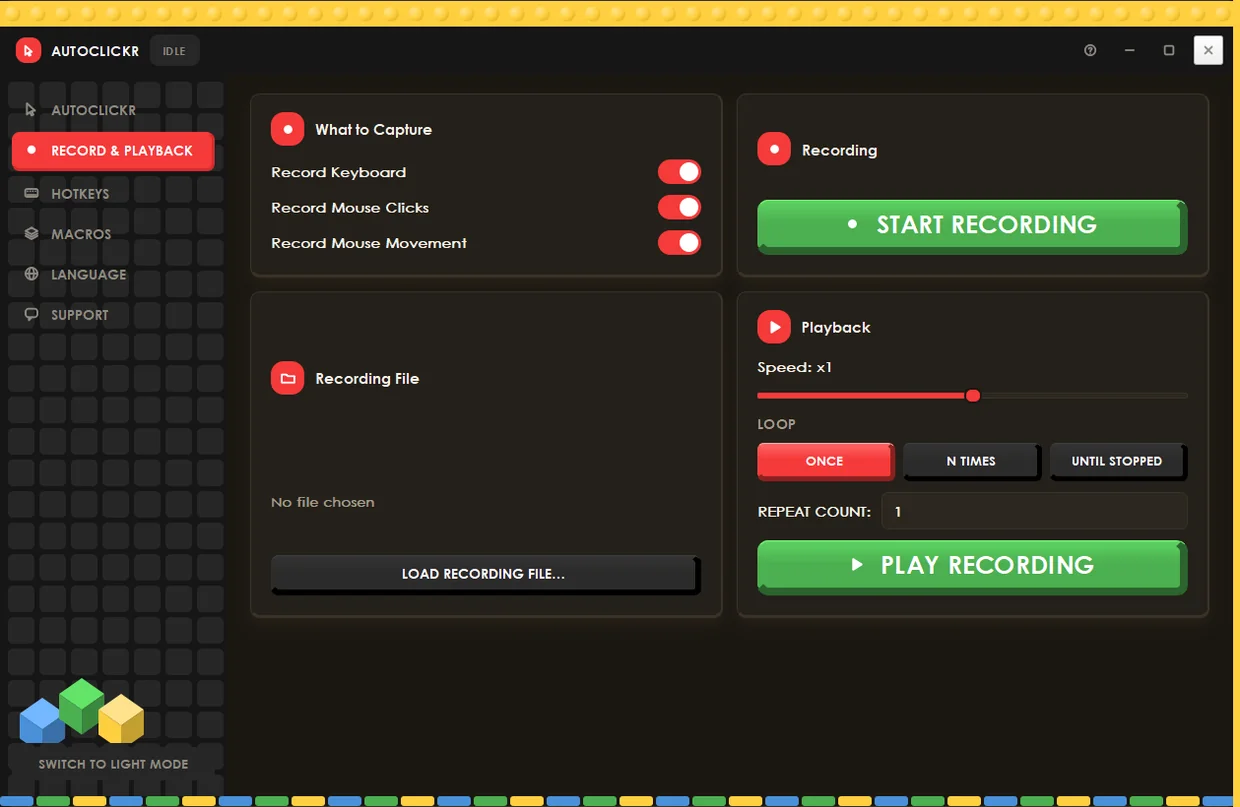
Record it
Press F3, do the task once, press F3 again. autoclickr captures your keystrokes, clicks and mouse movement with the real timing between them, and F4 replays it. Best when the sequence is fiddly and you would rather show it than specify it.
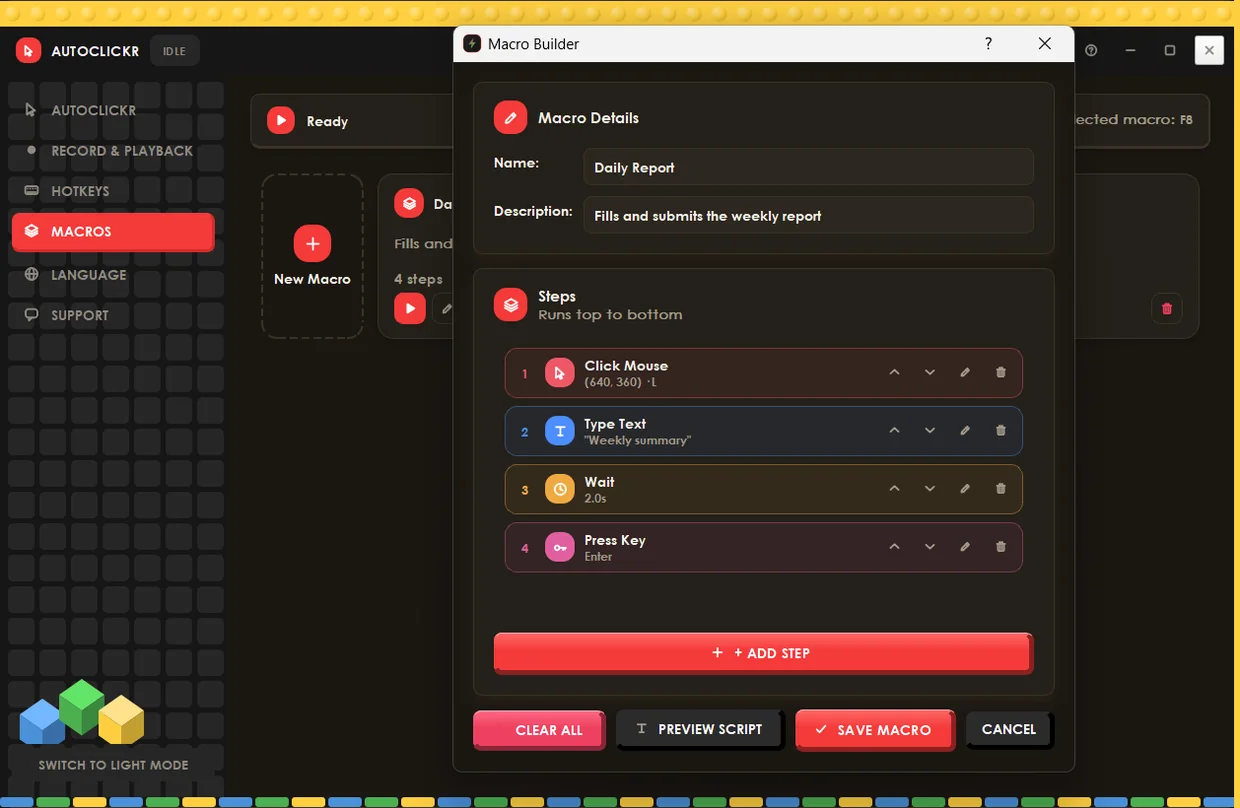
Build it
Add steps by hand: click a point, type text, wait, press a key, send a key combination, move the mouse, scroll, or loop a block. Best when you need exact coordinates, precise waits, or a sequence that repeats a section a set number of times.
What a recorded macro can contain
Clicks and typing
Left, middle and right clicks at recorded positions, plus every keystroke and key combination, with the pauses between them preserved.
Mouse movement
Movement is captured separately and can be switched off, which produces a smaller recording that jumps between points instead of tracing the path.
Playback speed
Replay at the recorded speed or faster. Run it once, a set number of times, or loop it until you stop it.
Loops inside a macro
The builder includes a repeat block, so a macro can run a section a set number of times inside a longer sequence. That covers the common shape of this work: open a record, do four things to it, close it, move to the next one, and repeat that fifty times without writing fifty copies of the same steps.
What is a macro recorder?
A macro recorder is a program that captures a sequence of keyboard and mouse actions and replays them on demand. It differs from an auto clicker in scope: an auto clicker repeats one action at an interval, while a macro recorder reproduces a whole series of different actions in order, with the timing between them.
What people use one for
The recurring case is software with no bulk action. An admin panel that approves one record at a time, a form that has to be filled the same way for every entry, a legacy tool with no API and no import. Recording the sequence once and replaying it is often the only automation available when nobody will build you an integration.
The other common case is testing. Record a path through an application, replay it a hundred times at whatever speed you choose, and watch which run breaks it.
Macro recorder or auto clicker?
Use an auto clicker when the task is the same click over and over: idle games, grinding, a single button that needs pressing a thousand times. Use a macro recorder when the task is a sequence: click here, type this, wait, press Enter, repeat. autoclickr includes both, so the choice is which section you open rather than which program you buy.
Where recordings are stored
Recordings and macros are saved to a file in your user profile, so they survive app updates and can be loaded again later. Nothing is uploaded, and the app works with no network connection at all.
Questions people actually ask
What is the difference between a macro recorder and an auto clicker?
An auto clicker repeats one action at a set interval. A macro recorder captures a sequence of different actions, including keystrokes and mouse movement, and replays them in order with their original timing.
autoclickr does both, so you do not need to choose a product, only a mode.
Can it record keyboard as well as mouse?
Yes. Keyboard, mouse clicks and mouse movement each have their own capture toggle, so you can record all three or leave movement out for a smaller, faster recording.
Can a macro repeat part of itself?
Yes. The macro builder includes a repeat block, so a section can loop a set number of times inside a longer sequence without duplicating the steps.
Can I edit a recording after making it?
Recordings replay as captured. If you need to change individual steps, build the sequence in the macro builder instead, where each step can be edited, reordered or deleted.
Are my recordings uploaded anywhere?
No. Recordings and macros are saved to a file in your user profile on your own machine. autoclickr runs offline and sends nothing anywhere.
Does the macro run while I am in another window?
Yes. F8 runs a selected macro and F4 replays a recording, and both hotkeys work while autoclickr is in the background.
The macro takes over your mouse and keyboard while it runs, so the hotkeys are how you stop it.